Pose Estimation with PoseNet in TensorFlow
Overview
PoseNet: https://github.com/tensorflow/tfjs-models/tree/master/posenet This article covers PoseNet. Pose estimation (skeleton estimation) of this kind estimates which coordinates in the input image correspond to which body points (such as elbows or wrists). PoseNet can estimate the following 17 points. These points are called Keypoints.
- nose
- leftEye
- rightEye
- leftEar
- rightEar
- leftShoulder
- rightShoulder
- leftElbow
- rightElbow
- leftWrist
- rightWrist
- leftHip
- rightHip
- leftKnee
- rightKnee
- leftAnkle
- rightAnkle
How Keypoints Are Detected
Reference (About the MobileNet version of PoseNet) https://medium.com/tensorflow/real-time-human-pose-estimation-in-the-browser-with-tensorflow-js-7dd0bc881cd5
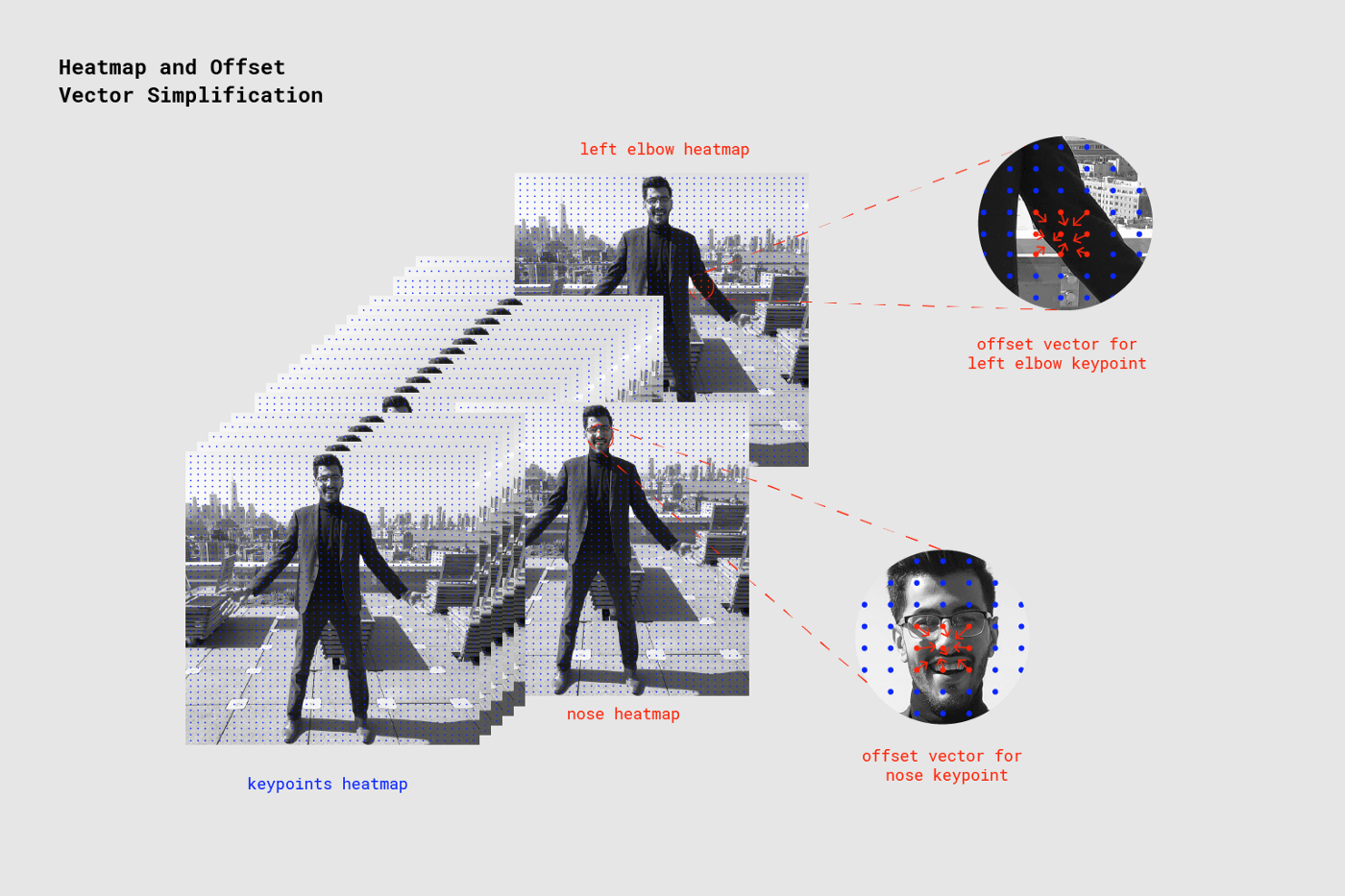
The pre-trained MobileNet takes an image as input and outputs tensors such as keypoint heatmaps and offset vectors shown in the image below.
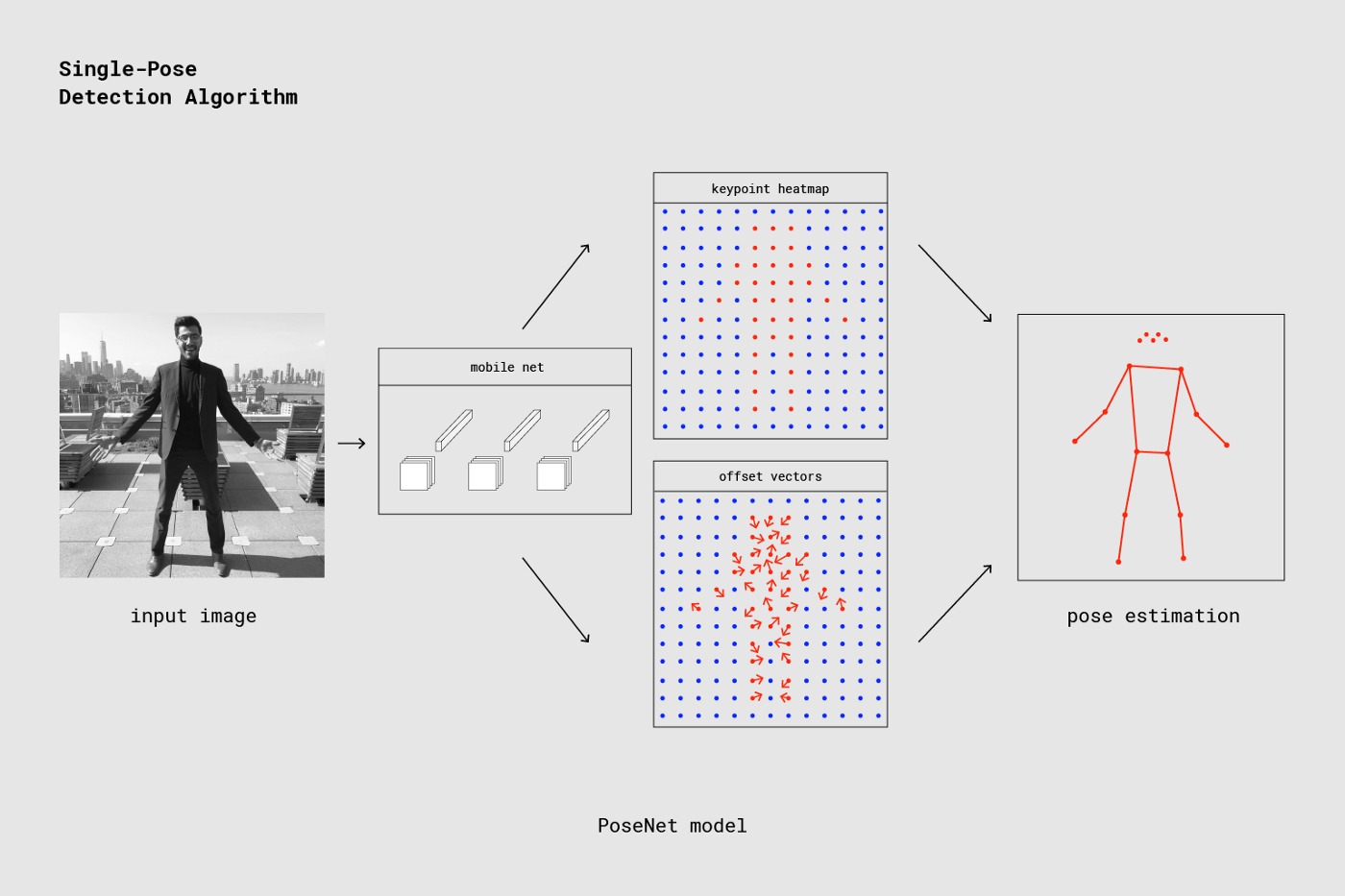 The reason keypoint heatmaps and offset vectors appear in a grid pattern in the image is because of the outputStride (similar to a mesh width), which is designed to speed up the processing pipeline.
Increasing the outputStride value creates a coarser grid, improving processing speed but reducing accuracy.
The reason keypoint heatmaps and offset vectors appear in a grid pattern in the image is because of the outputStride (similar to a mesh width), which is designed to speed up the processing pipeline.
Increasing the outputStride value creates a coarser grid, improving processing speed but reducing accuracy.
Then, the keypoint heatmap is passed through a sigmoid activation to produce scores --> heatmapPositions.
Keypoints are computed from these three elements (heatmapPositions, offset vectors, outputStride).
keypointPositions = heatmapPositions * outputStride + offsetVectors
About Offset Vectors
This appears to be PoseNet's key invention. There are 3 types: Long-range offsets, Short-range offsets, and Mid-range offsets. Among these, the most important is Short-range offsets. Offset vectors basically refer to a collection of Short-range offset vector data. Long-range offsets are not used in pose estimation.
Long-range Offsets
Below is an example showing Long-range offsets (vectors) pointing toward the nose.
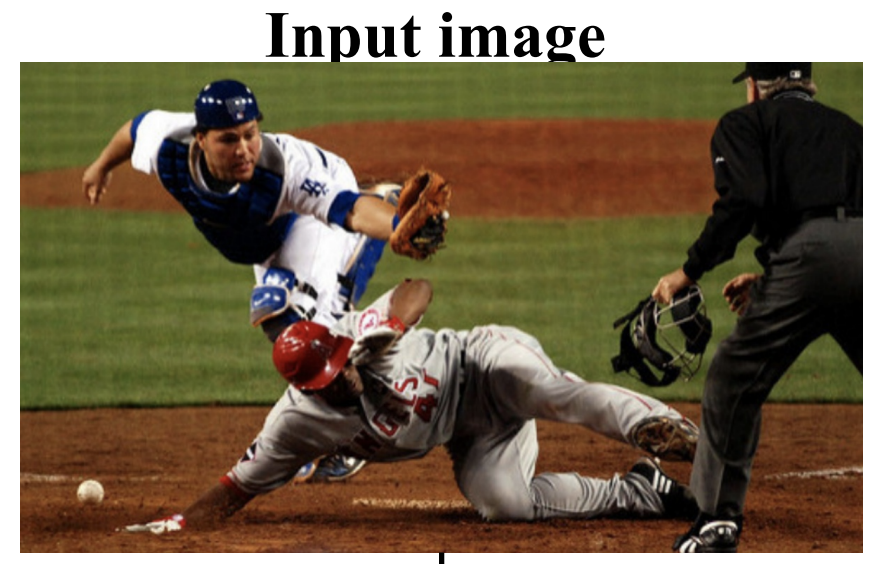
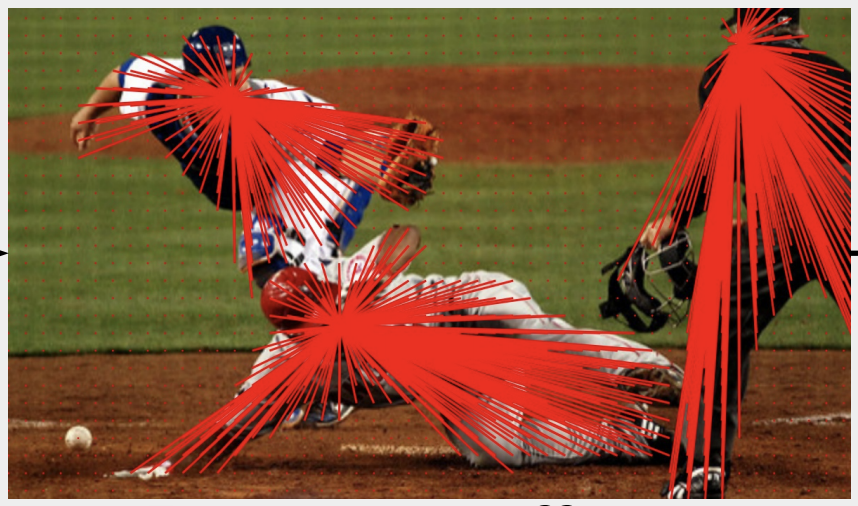
Note that Long-range offsets are not used in pose estimation (they are used in the segment module). The pose estimation module uses Short-range offsets and Mid-range offsets, which represent vectors within local regions as described below.
About Short-range Offsets
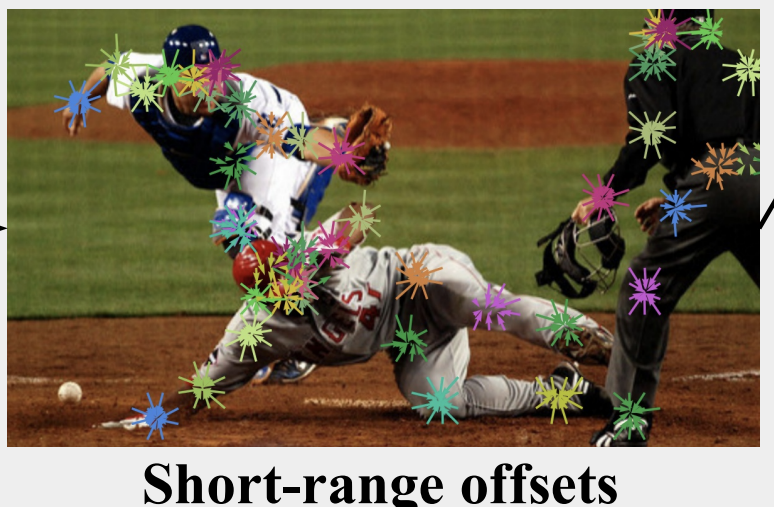 Short-range offsets are vector information from each grid point that uniquely determines the keypoint coordinates. (If there are 10x20 grid points defined by the outputStride, the size of Short-range offsets for one keypoint is 20x10x2, since it stores x and y direction vector information for each point.)
Offset vectors combine the Short-range offsets for all 17 keypoints. (So if there are 10x20 grid points, the size is 20x10x34.)
Short-range offsets are vector information from each grid point that uniquely determines the keypoint coordinates. (If there are 10x20 grid points defined by the outputStride, the size of Short-range offsets for one keypoint is 20x10x2, since it stores x and y direction vector information for each point.)
Offset vectors combine the Short-range offsets for all 17 keypoints. (So if there are 10x20 grid points, the size is 20x10x34.)
The figure below illustrates how the nose keypoint is detected by referencing the Short-range offsets near the nose heatmap (the left elbow is detected similarly).
About Mid-range Offsets
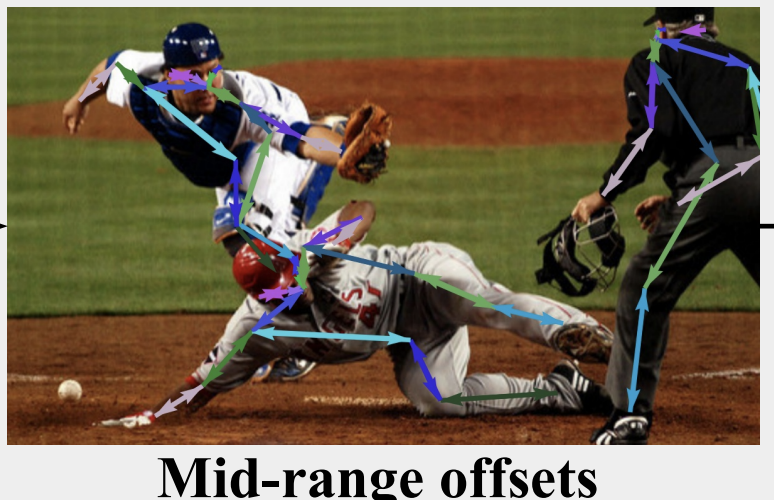 Mid-range offsets store the positions and connectivity relationships between keypoints.
Network Architecture
Model Architecture (Using MobileNet)
Currently, there is also a ResNet version with higher accuracy but slower speed; here we focus on the MobileNet version. The following is about the original model:
https://qiita.com/otmb/items/561a62d3413295cc744e
Although not discussed on this page, with outputStride set to 16 and input image size of 513, the output tensor size per side is 33, calculated as
((513 - 1)// 16) + 1 = 33.Formula: https://medium.com/tensorflow/real-time-human-pose-estimation-in-the-browser-with-tensorflow-js-7dd0bc881cd5 Resolution = ((InputImageSize - 1) / OutputStride) + 1
One standard convolution first, then
depthwise_conv2d
relu6
conv2d
relu6
repeated 13 times, outputting 4 tensors, followed by one more convolution on each, outputting 4 tensors.
About kernel sizes: https://github.com/tensorflow/tfjs/issues/1137 https://github.com/tensorflow/tfjs/issues/1137#issuecomment-462450145
multi_person_mobilenet_v1_075_float.tfliteis discussed below.
Only the keypoint heatmap is passed through sigmoid activation as described earlier; the other tensors are used as-is.
The output tensors are labeled as keypoint, heatmap, offset vectors, horizontal, vertical directions in the diagram, but in the code they are handled as heatmap, offset, displacementFwd, displacementBwd. The (horizontal, vertical) or (displacementFwd, displacementBwd) are actually Mid-range offsets.
As described above, the skeleton coordinates are computed using these 4 output tensors. However, the latest tflite model uses a model that directly outputs keypoints...
Model Analysis
It was found that the architecture and computation methods vary significantly between versions. The investigation was conducted with the multiplier fixed at 0.75. (Only tflite models with 0.75 were found.)
- (Original: TensorFlow.js version (checkpoint)
https://github.com/tensorflow/tfjs-models/tree/master/posenet
- Unofficial Python-converted version (Protocol Buffer (.pb))
Variable input size
4 outputs (heatmap, offset, mid-offsets (displacement_fwd, displacement_bwd))
https://github.com/rwightman/posenet-python model-mobilenet_v1_075.pb: 5.1MB
- TensorFlow Lite official page pose_estimation
Fixed input size 257x353
4 outputs (heatmaps, short_offsets, mid_offsets, segments)
https://www.tensorflow.org/lite/models/pose_estimation/overview#get_started multi_person_mobilenet_v1_075_float.tflite: 5.0 MB
- TensorFlow Lite model for Google Coral
Unlike previous versions, this directly outputs keypoints.
Fixed input size (specified in filename)
Outputs: 4 poses (Keypoints), poses:1 (keypoint_scores), poses:2 (pose_scores), poses:3 (empty)
https://github.com/google-coral/project-posenet posenet_mobilenet_v1_075_353_481_quant_decoder_edgetpu.tflite: 1.5 MB posenet_mobilenet_v1_075_481_641_quant_decoder_edgetpu.tflite: 1.7 MB posenet_mobilenet_v1_075_721_1281_quant_decoder_edgetpu.tflite: 2.5 MB
Unofficial Python-Converted Version (Protocol Buffer (.pb))
File Size
model-mobilenet_v1_075.pb: 5.1MB (model-mobilenet_v1_101.pb: 13.3MB)
Outputs
heatmap_2
offset_2
displacement_fwd_2
displacement_bwd_2
Architecture
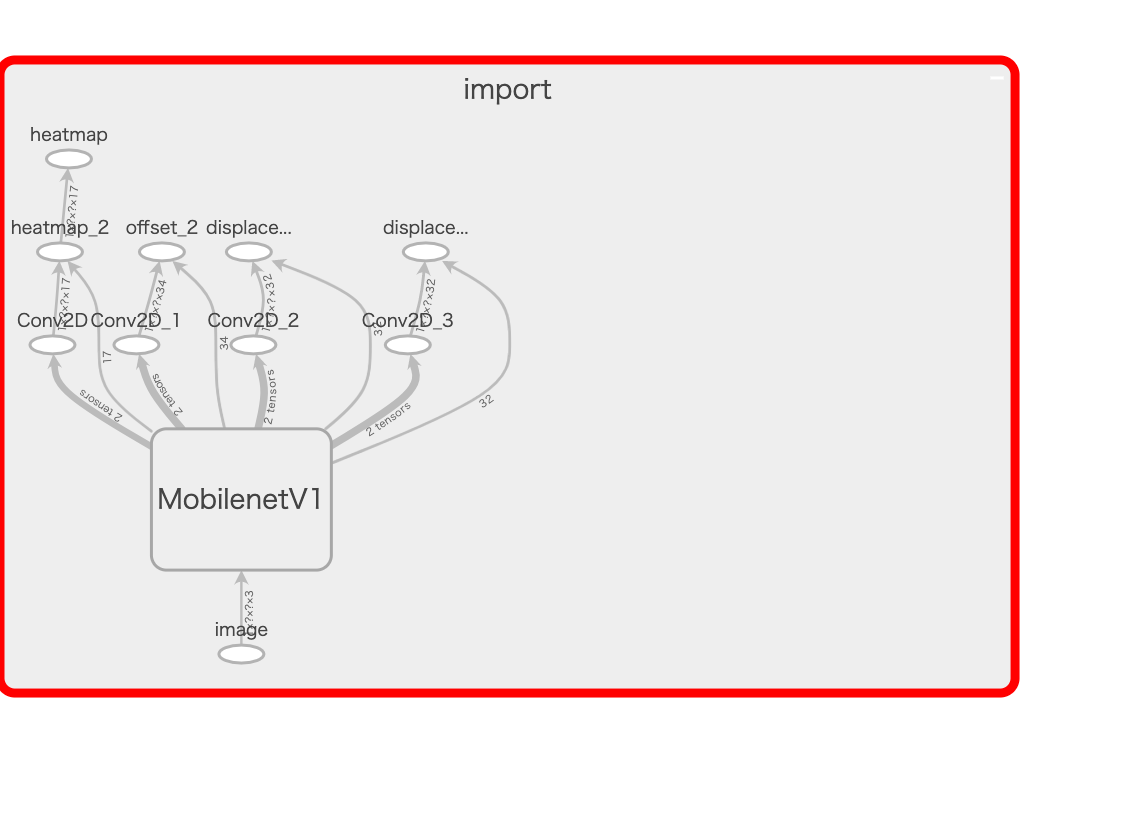
I attempted to analyze the MobilenetV1 interior shown in the above image using TensorBoard and render it as an image, but the resulting image was too large to attach. Upon inspection, it was confirmed to be the same architecture as described in the Model Architecture (Using MobileNet) section above.
TensorFlow Lite Official Page pose_estimation
Not much detailed information is available, but this was downloaded from https://www.tensorflow.org/lite/models/pose_estimation/overview#get_started. It appears to be intended for Android and iOS use.
The previously separate mid_offsets are now combined into a single output, and a new segments output has been added.
Conversion to kmodel for K210
Fatal: Layer DepthwiseConv2d is not supported
This error was encountered.
https://github.com/kendryte/nncase/issues/14#issuecomment-489506085 Check your DepthwiseConv2d with 3x3 kernel and 2x2 stride, there is a hardware limitation that you must use tf.pad([[0,0],[1,1],[1,1],[0,0]]) to pad your input and the use valid padding in your DepthwiseConv2d.
It seems you need to add tf.pad([[0,0],[1,1],[1,1],[0,0]]) before the DepthwiseConv2d with 2x2 stride to adjust dimensions, and use valid padding in the DepthwiseConv2d.
File Size
multi_person_mobilenet_v1_075_float.tflite: 5.0 MB
Outputs
float_heatmaps
float_mid_offsets
float_segments
float_short_offsets
Architecture
https://github.com/tensorflow/tensorflow/blob/master/tensorflow/lite/tools/visualize.py was used to inspect the contents. Setup instructions for visualize.py are described later. The architecture itself is not significantly different from the previous versions.
After the input and initial conv2d:
depthwise_conv2d
relu6
conv2d
relu6
repeated 13 times, with displacement_fwd and displacement_bwd each processed through conv2d and then concatenated. (Only this part differs from previous versions.)
TensorFlow Lite Model for Google Coral
Unlike previous versions, this directly outputs keypoints. Compared to the pose_estimation above, the architecture is much simpler, but it is unclear what is happening internally. It may be necessary to investigate the Edge TPU library.
https://github.com/google-coral/project-posenet/blob/master/pose_engine.py
Outputs
poses(Keypoints)
poses:1(keypoint_scores)
poses:2(pose_scores)
poses:3(empty)
File Size
posenet_mobilenet_v1_075_353_481_quant_decoder_edgetpu.tflite: 1.5 MB
posenet_mobilenet_v1_075_481_641_quant_decoder_edgetpu.tflite: 1.7 MB
posenet_mobilenet_v1_075_721_1281_quant_decoder_edgetpu.tflite: 2.5 MB
Architecture
For posenet_mobilenet_v1_075_353_481_quant_decoder_edgetpu.tflite with input size 353x481:
nputs/Outputs
inputs
3 sub_2 UINT8 [1, 353, 481, 3]

outputs [4, 5, 6, 7]
4 poses FLOAT32 [1, 10, 17, 2]
5 poses:1 FLOAT32 [1, 10, 17]
6 poses:2 FLOAT32 [1, 10]
7 poses:3 FLOAT32 []

Tensors
index name type shape buffer quantization
0 MobilenetV1/heatmap_2/BiasAdd UINT8 [1, 23, 31, 17] 0 {'scale': [0.047059], 'zero_point': [128], 'details_type': 'NONE', 'quantized_dimension': 0}
1 MobilenetV1/offset_2/BiasAdd UINT8 [1, 23, 31, 34] 0 {'scale': [0.392157], 'zero_point': [128], 'details_type': 'NONE', 'quantized_dimension': 0}
2 concat UINT8 [1, 23, 31, 64] 0 {'scale': [1.387576], 'zero_point': [117], 'details_type': 'NONE', 'quantized_dimension': 0}
3 sub_2 UINT8 [1, 353, 481, 3] 0 {'scale': [0.007812], 'zero_point': [128], 'details_type': 'NONE', 'quantized_dimension': 0}
4 poses FLOAT32 [1, 10, 17, 2] 7 {'min': [-10.0], 'max': [10.0], 'details_type': 'NONE', 'quantized_dimension': 0}
5 poses:1 FLOAT32 [1, 10, 17] 2 {'min': [-10.0], 'max': [10.0], 'details_type': 'NONE', 'quantized_dimension': 0}
6 poses:2 FLOAT32 [1, 10] 6 {'min': [-10.0], 'max': [10.0], 'details_type': 'NONE', 'quantized_dimension': 0}
7 poses:3 FLOAT32 [] 8 {'min': [-10.0], 'max': [10.0], 'details_type': 'NONE', 'quantized_dimension': 0}


Ops
index inputs outputs builtin_options opcode_index
0 [3]  [0, 1, 2] None CUSTOM (0)
1 [0, 1, 2] [4, 5, 6, 7] None CUSTOM (1)
The identity of CUSTOM remains a mystery.